
Support for your Mobile App: What It Includes and Why It Matters
Launching a mobile app is not the end of the development process. In many ways, it is the beginning.
Once an application is available to real users, it has to operate across changing mobile devices, new operating system versions, updated APIs, evolving security requirements, and constantly changing App Store and Google Play policies.
That is where mobile app maintenance comes in.
Mobile app maintenance is the ongoing process of keeping an application secure, compatible, reliable, fast, and useful after its initial release. Maintenance can include everything from fixing minor bugs to updating an application for a new version of iOS or Android.
Businesses that treat a mobile application as a one-time development project can eventually find themselves with an app that is difficult to update, incompatible with newer devices, or no longer accepted by the major app stores.
A good mobile app maintenance strategy protects the original investment made in the application while creating a foundation for future improvements.
What Is Mobile App Maintenance?
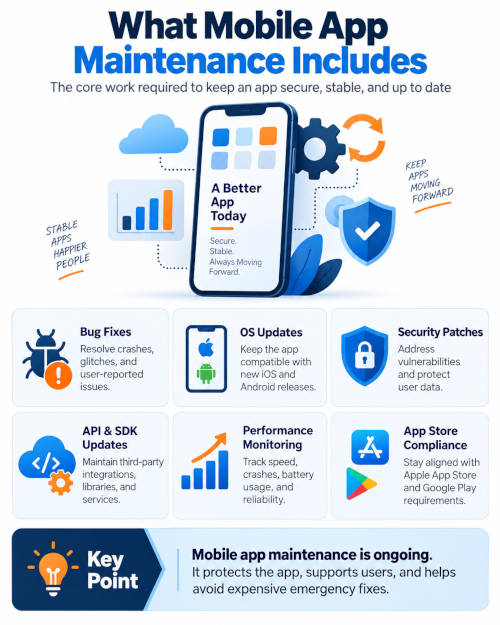
Mobile app maintenance includes the technical work required to support an application after it has been released.
This can include:
- Fixing bugs and application crashes.
- Updating the application for new versions of iOS and Android.
- Updating third-party libraries and software development kits.
- Maintaining API integrations.
- Updating backend servers and databases.
- Addressing security vulnerabilities.
- Monitoring application performance.
- Supporting new smartphones, tablets, and screen sizes.
- Maintaining push notifications and messaging services.
- Updating payment processing integrations.
- Responding to changes in App Store and Google Play requirements.
- Improving application speed and stability.
- Updating analytics and tracking systems.
- Adding smaller features and user interface improvements.
The exact maintenance requirements depend heavily on what the application does.
A simple application that primarily displays information may require relatively little maintenance.
An application that processes payments, connects to multiple APIs, communicates with cloud servers, stores customer information, or performs complicated business processes will generally require considerably more ongoing attention.
Businesses investing in mobile app development should plan for ongoing maintenance before their application is launched. Making the right architectural and technology decisions during the initial development process can help reduce future maintenance costs and make the application easier to support.
Why Do Mobile Apps Need Maintenance?
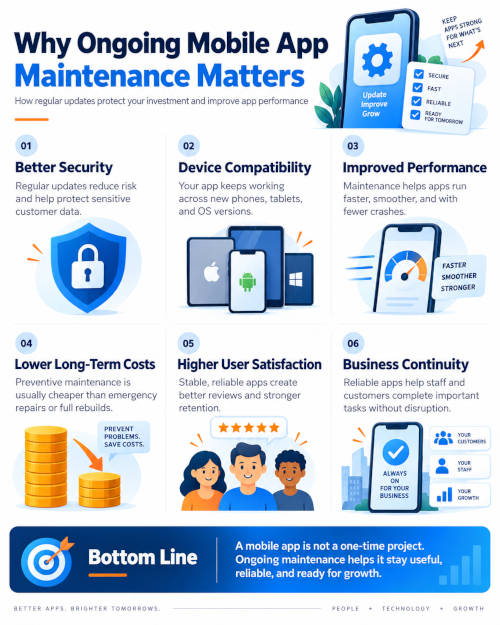
Mobile applications operate inside an ecosystem that is constantly changing.
Even if your application code does not change, almost everything surrounding it eventually will.
Apple releases new versions of iOS. Google updates Android. Smartphone manufacturers introduce different hardware. Cloud platforms modify APIs. Payment gateways introduce new security requirements. Third-party development libraries are updated or discontinued.
An application that works perfectly today is not guaranteed to continue working perfectly indefinitely.
Mobile app maintenance allows developers to react to these changes before they become serious problems for users.
Operating System Updates
One of the biggest reasons mobile applications require ongoing maintenance is operating system updates.
Apple and Google regularly introduce new versions of their mobile operating systems.
These updates can introduce:
- New security requirements.
- Changes to application permissions.
- Updated notification systems.
- New background processing restrictions.
- Changes to location services.
- New privacy requirements.
- Different interface behavior.
- Changes to supported development frameworks.
Developers normally begin testing applications against upcoming operating system versions before those versions become widely available.
Apple provides developers with extensive guidelines and technical requirements for applications distributed through the App Store. You can review Apple’s current requirements through the Apple App Store Review Guidelines .
Android developers face similar requirements.
Google maintains its own application quality guidelines covering areas including user experience, technical quality, privacy, security, and compatibility.
You can learn more about these requirements through Google’s Android App Quality Guidelines .
Keeping an application compatible with both platforms should therefore be considered part of normal application ownership.
Bug Fixes
No reasonably complex piece of software is completely free of bugs.
Some problems may not appear during development or quality assurance testing. They only become apparent after thousands of users begin running the application on different devices, operating system versions, networks, and configurations.
For example, an application may work perfectly on most devices but crash when a specific Android manufacturer handles a permission differently.
Another application might experience a problem only when a user has extremely poor cellular connectivity.
These types of issues are difficult to identify before an application is released.
Post-launch monitoring allows developers to identify these problems and release corrections.
Bug fixing is therefore one of the most basic components of mobile app maintenance.
Application Performance Monitoring
Users expect mobile applications to respond quickly.
An application that freezes, crashes, consumes excessive battery power, or takes too long to load can quickly lose users.
Maintenance should include monitoring technical performance over time.
Developers may monitor:
- Application crashes.
- Application Not Responding errors.
- API response times.
- Server response times.
- Memory consumption.
- Battery usage.
- Network failures.
- Database performance.
- Authentication failures.
Google provides Android developers with Android Vitals, which tracks performance measurements including crash rates, application responsiveness, battery behavior, and other technical issues.
These measurements can have implications beyond the user’s experience. Google states that core Android vitals can affect an application’s visibility on Google Play.
Monitoring performance therefore helps both application stability and the application’s long-term presence in the marketplace.
Security Updates
Security should be one of the most important components of mobile app maintenance.
Applications frequently communicate with remote servers and may handle information such as:
- Customer accounts.
- Email addresses.
- Passwords.
- Payment information.
- Business records.
- Location information.
- Uploaded documents.
- Photographs.
- Authentication tokens.
Security vulnerabilities can be discovered in operating systems, libraries, APIs, and development frameworks long after an application is originally released.
Developers should regularly evaluate third-party dependencies and replace outdated components when necessary.
Application security also extends beyond the mobile application itself.
The entire system may include web servers, APIs, cloud services, databases, authentication systems, file storage systems, administrative portals, and third-party services.
A vulnerability anywhere in that infrastructure can potentially affect the mobile application.
The OWASP Mobile Application Security Project maintains standards, common weakness information, and testing guidance specifically for mobile application security.
Security maintenance should therefore be viewed as an ongoing process rather than something performed only before an application’s initial release.
Updating Third-Party Libraries and SDKs
Modern mobile applications are rarely built completely from scratch.
Developers frequently use third-party software development kits and libraries for features such as:
- Payments.
- Analytics.
- Maps.
- Authentication.
- Social media integration.
- Advertising.
- Push notifications.
- Customer support.
- Video.
- Cloud storage.
- Artificial intelligence.
These components also require maintenance.
A third-party provider may release a new version of its SDK, discontinue an old API, or change authentication requirements.
Sometimes the update is optional.
Other times, applications using an older integration will eventually stop functioning.
Maintaining an inventory of important third-party components makes it easier to identify which systems need to be tested when updates are released.
API Maintenance
Many business applications depend heavily on APIs.
The mobile application may simply be the user-facing portion of a much larger software platform.
For example, an application might retrieve customer information from a CRM, process payments through a payment gateway, obtain inventory from an ERP system, and send data to a custom cloud application.
Every one of those connections introduces another potential maintenance requirement.
APIs can change.
Authentication methods can change.
Endpoints can be deprecated.
Rate limits can be modified.
Data structures can be updated.
If the mobile application depends on an external API, somebody needs to monitor that integration and respond when changes occur.
This is particularly important when an application depends on APIs operated by another company because you have little control over when that company makes changes.
Backend and Server Maintenance
Mobile application maintenance frequently involves much more than maintaining the application installed on the user’s phone.
Many mobile apps rely on backend infrastructure that may include:
- Web servers.
- Application servers.
- Databases.
- Cloud storage.
- API servers.
- Email services.
- Authentication systems.
- Push notification systems.
- Administrative portals.
This infrastructure requires its own maintenance.
Server operating systems need security updates. Databases need maintenance. SSL certificates must remain valid. Cloud services must be monitored. Backups should be tested.
As an application’s user base grows, the infrastructure may also need to be expanded.
An application built to support 500 users may require a very different architecture when it begins supporting 100,000 users.
Backend scalability should therefore be reviewed as part of long-term mobile app maintenance.
App Store and Google Play Requirements
Apple and Google control the two dominant mobile application marketplaces.
Both companies periodically update the technical and policy requirements developers must meet when submitting or updating applications.
Requirements can involve:
- Privacy disclosures.
- Data collection.
- Account deletion.
- Application permissions.
- Payment systems.
- Subscription policies.
- SDK versions.
- Security.
- User-generated content.
- Advertising.
- Target operating system versions.
An application that was accepted several years ago is not automatically guaranteed to meet today’s submission requirements.
This becomes particularly important when an older application suddenly needs an emergency update.
If the app has not been maintained for several years, developers may first have to update substantial portions of the project simply to compile and submit a new version.
Mobile App Maintenance Versus Adding New Features
Maintenance and new development are related, but they are not exactly the same thing.
Maintenance generally refers to keeping existing functionality operating correctly.
Examples include updating the app for a new version of iOS, fixing a crash, updating a payment SDK, replacing a deprecated API, or correcting a security vulnerability.
New development involves expanding what the application can do.
Examples might include adding online ordering, a customer rewards program, AI functionality, document scanning, new reporting tools, or an entirely new administrative interface.
Businesses should ideally budget separately for basic maintenance and continued application development.
This makes it easier to distinguish the cost of keeping the existing system operational from investments in expanding the product.
Corrective Maintenance
Corrective maintenance addresses something that is already broken.
For example, users might report that the app crashes when uploading a photograph.
Developers investigate the problem, identify its cause, correct the code, test the application, and release an update.
Corrective maintenance is generally what people think about first when they hear the term application maintenance.
But it represents only one part of the process.
Preventive Maintenance
Preventive maintenance attempts to fix problems before users encounter them.
This could include updating an aging software library even though it still works today.
It might also include replacing an API scheduled for retirement six months from now.
Preventive maintenance is extremely valuable because planned updates are usually easier to manage than emergency repairs.
Waiting until something completely stops working can result in application downtime, emergency development work, negative customer reviews, lost transactions, and App Store submission delays.
Regular maintenance gives developers time to address these issues methodically.
Adaptive Maintenance
Adaptive maintenance involves updating an application because something around it changed.
A new version of iOS is a good example.
Nothing may be wrong with the original application code, but a change to Apple’s operating system may require developers to modify the application.
The same situation can occur when:
- Android changes.
- An API changes.
- A payment processor changes.
- A cloud provider changes.
- Privacy regulations change.
- A device manufacturer introduces new hardware.
Adaptive maintenance represents a significant portion of long-term mobile application support.
Perfective Maintenance
Perfective maintenance focuses on improving an application rather than simply fixing problems.
Developers may notice that users frequently abandon a particular screen or struggle to complete a process.
The development team could redesign that workflow to make the application easier to use.
Other examples include:
- Improving loading speed.
- Simplifying navigation.
- Reducing the number of screens required to complete a process.
- Improving search functionality.
- Optimizing database queries.
- Making forms easier to use.
- Improving accessibility.
These improvements may be relatively small individually, but they can substantially improve the application over several years.
What Happens If You Don’t Maintain a Mobile App?
An application does not necessarily stop working immediately when maintenance stops.
That is partly why businesses sometimes neglect it.
The app may continue functioning for months or even years.
Problems gradually begin accumulating.
A library becomes outdated.
An API changes.
A new phone screen exposes an interface problem.
A security vulnerability is discovered.
A future version of Android introduces a compatibility problem.
Eventually, the organization may discover that updating the application has become considerably more complicated than it would have been with regular maintenance.
This is similar to maintaining an older website or server.
Technical debt accumulates.
The longer maintenance is postponed, the more expensive the eventual modernization project can become.
How Often Should a Mobile App Be Updated?
There is no universal update schedule that applies to every mobile application.
An application should not be updated simply because a certain number of weeks have passed.
Instead, the underlying system should be monitored continuously and updates released when there is a technical or business reason to do so.
A typical maintenance process might include:
Monthly reviews: Reviewing crash reports, security alerts, server performance, application analytics, and user feedback.
Quarterly reviews: Reviewing libraries, SDKs, APIs, infrastructure, and upcoming operating system changes.
Annual planning: Preparing for major iOS and Android releases, larger technical upgrades, and new application features.
Critical security vulnerabilities or major bugs should obviously be addressed as soon as practical rather than waiting for a scheduled maintenance period.
Testing Is Part of Mobile App Maintenance
Every application update should be tested.
A seemingly small change can unexpectedly affect another area of the application.
Testing can include:
- Functional testing.
- Regression testing.
- Device testing.
- Operating system testing.
- API testing.
- Payment testing.
- Security testing.
- Performance testing.
Automated testing can reduce some of the workload, but manual testing often remains important, particularly for critical business workflows.
Applications that process payments or perform complicated business processes may require more extensive testing than simple consumer applications.
User Feedback Can Help Prioritize Maintenance
Application reviews, support requests, analytics, and customer feedback provide useful information about where development resources should be spent.
If multiple users report the same problem, that issue should probably receive a higher priority.
Analytics can also reveal problems users do not explicitly report.
For example, if users consistently abandon a multi-step registration process at the same screen, there may be a usability issue worth investigating.
A maintenance strategy should therefore combine technical monitoring with actual user behavior.
Don’t Forget About Older Mobile Apps
Many businesses have older applications that are still important to their operations.
An app developed five or ten years ago may still perform its original job perfectly well.
That does not automatically mean the application needs to be rewritten.
In many cases, an experienced development team can evaluate the existing source code and determine whether upgrading the current application makes more sense than replacing it.
Possible options include:
- Updating the existing application.
- Replacing outdated libraries.
- Updating APIs.
- Modernizing portions of the code.
- Rebuilding only the user interface.
- Migrating the backend while keeping portions of the mobile application.
- Rewriting the application entirely.
The correct decision depends on the application’s architecture, programming language, business importance, existing problems, and future plans.
Rewriting an application simply because it is old can be unnecessarily expensive.
At the same time, continuously patching an application built on obsolete technology can eventually become more expensive than modernization.
A technical review can help determine where that line exists.
Native Apps Versus Cross-Platform Apps
Maintenance requirements can also vary based on how the application was originally developed.
Native iOS and Android applications typically have separate platform-specific projects.
An iPhone application might be built using Swift or Objective-C while the Android application is built using Kotlin or Java.
Cross-platform applications may use technologies such as Flutter, React Native, .NET MAUI, or other frameworks that share code between platforms.
Each approach has maintenance advantages and disadvantages.
Cross-platform applications may allow some updates to be made once across both platforms.
Native applications can provide more direct access to platform-specific capabilities but may require separate development work for iOS and Android.
Regardless of the underlying technology, both approaches require ongoing testing against changes made by Apple and Google.
Choosing the right technology during the mobile application development process can help reduce future maintenance costs. Businesses should consider not only the initial development budget but also the long-term availability of development tools, third-party libraries, and technical support.
Maintaining Custom Business Applications
Maintenance is especially important for custom business applications.
These applications frequently connect to internal systems and perform tasks that directly affect day-to-day business operations.
Examples include:
- Field inspection applications.
- Inventory management systems.
- Employee scheduling applications.
- Customer management systems.
- Sales tools.
- Delivery applications.
- Document management systems.
- Construction field applications.
- Healthcare workflow applications.
- Data collection systems.
Unlike a consumer app that can occasionally tolerate a minor inconvenience, problems in a business application can prevent employees from doing their jobs.
For these applications, reliability can be more important than continually adding new features.
Mobile App Maintenance Should Be Planned Before Launch
One of the best times to think about maintenance is before the application is built.
Developers can make architectural decisions that make future updates easier.
This can include:
- Separating the mobile application from backend business logic.
- Properly documenting APIs.
- Using version control.
- Maintaining development and production environments.
- Creating automated build processes.
- Maintaining test accounts.
- Documenting third-party integrations.
- Avoiding unnecessary dependencies.
- Building administrative tools.
- Creating database backup procedures.
A well-organized application can be significantly easier and less expensive to maintain than an application where all of the components are tightly connected or poorly documented.
Who Should Maintain Your Mobile App?
Ideally, the company maintaining an application should have access to:
- The complete source code.
- App Store Connect.
- Google Play Console.
- Source code repositories.
- API documentation.
- Cloud hosting accounts.
- Database information.
- Developer certificates.
- Third-party service accounts.
- Build documentation.
The original developer may be the easiest company to use because that team already understands the architecture.
However, businesses are not necessarily permanently tied to the company that originally developed the application.
Another experienced development company can often take over an existing project.
The transition is considerably easier when the application was properly documented and the business owns or controls the necessary accounts and source code.
Businesses should make sure they retain appropriate access to their own application infrastructure even when an outside development company manages it.
Mobile App Maintenance Is an Investment in the Application
A custom mobile application can represent a significant investment.
Regular maintenance helps protect that investment.
The objective is not simply to keep issuing application updates.
The objective is to keep the software useful, secure, compatible, and reliable for as long as it continues providing value to the business.
Good maintenance can extend the useful life of an application for many years.
It can also make future upgrades easier because technical problems are addressed gradually rather than accumulating into one enormous modernization project.
Mobile App Maintenance Services From Firecane Digital
Firecane Digital provides custom mobile app development services for businesses with new and existing applications, including ongoing maintenance, modernization, and custom software development.
We can work with applications developed by our team or evaluate an application originally created by another developer.
Our mobile application services can include:
- iOS application maintenance.
- Android application maintenance.
- Legacy mobile application support.
- Bug fixes.
- API integrations.
- Third-party SDK updates.
- App Store and Google Play updates.
- Backend development and maintenance.
- Cloud and server integration.
- Application modernization.
- Security improvements.
- Performance optimization.
- New feature development.
- Custom business software integration.
We also work with businesses that have older software and need help determining whether an existing application should be updated, partially modernized, or rebuilt.
With more than 20 years of experience in web development, software development, integrations, hosting, and digital technology, Firecane Digital can help businesses maintain the software they already depend on while planning for what comes next.
If your mobile application has not been updated recently, is experiencing compatibility problems, needs new features, or was abandoned by its original developer, contact Firecane Digital to discuss your project.
Firecane Digital provides web development, mobile application development, WordPress development, custom programming, hosting, IT support, SEO, and digital marketing services.
Visit Firecane.com to learn more about our services or contact us to discuss your mobile application maintenance needs.